
GeoReg

As of Dec 9th, 2015, this plugin is not available for sale because the API we used is no longer free.
AppThemes GeoReg captures valuable geographic information about users who register on your site. It’s completely transparent and works behind the scenes without any setup or configuration. We promise you’ll be in awe with how powerful, yet simplistic it is!
For a live demo, visit the MaxMind website. It will show your current location based on your IP address using the same lookup as this plugin.
Want to test drive the plugin first? Download the free GeoReg Lite version from the WordPress plugins directory! Or if you prefer, install the lite version directly from within your WordPress admin area. Just go to “Plugins” => “Add New” => and search for “GeoReg Lite”.
Feature Highlights
- Works right out of the box. No configuration!
- Supports any WordPress theme (that uses the WordPress registration page or hooks)
- No code or theme template files to edit
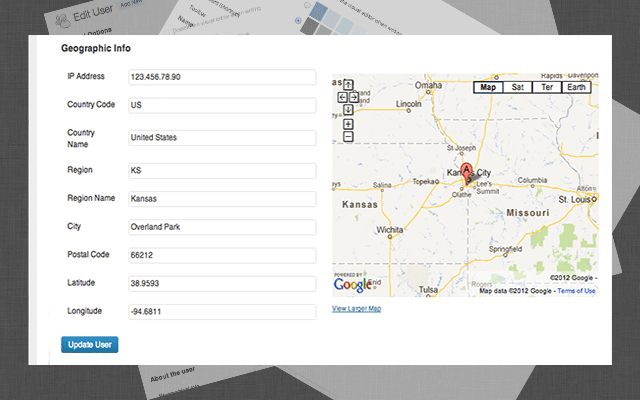
- Captures the IP address, country, region (state), city, postal code, latitude, longitude, and more
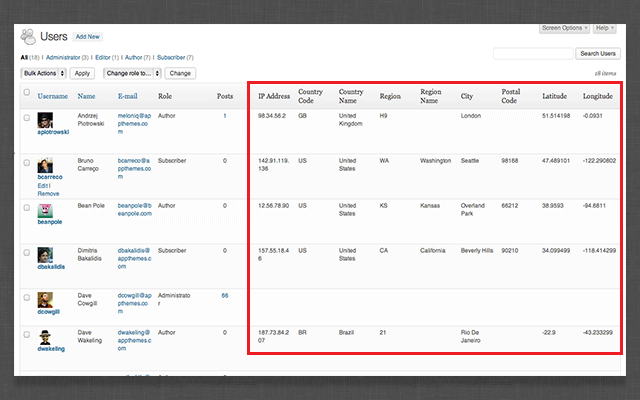
- Adds geographic columns to the wp-admin user screen
- Includes embedded Google Map (in your language) on the user edit page
- Supports any language (text translation and .pot file required)
- Dedicated forum-based support provided by our customer service team
Advanced Features
- Works with AppThemes’ themes
- Works with both WordPress standard & Multisite
- Works with BuddyPress
- Works with bbPress
- Supports both http and https websites
- Portability. WordPress export includes all data
- Clean, professional, well commented code
- Includes WordPress filters for developers
- Uses the WordPress API, hooks & filters for quick processing
- No hardcoded select statements or custom database tables
- Uses the WordPress user meta table
- Very small footprint. Uses the MaxMind js so there’s no large dat files to include
There are countless ways to leverage geo information. Here are a few ideas: **
- Personalized web content
- Region-specific advertising and offers
- Easily calculate VAT or sales tax
- Block users based on region or IP address
- Conduct traffic analysis & data mining
** Note: GeoReg only gathers and stores geographic information when new users register. You will need another plugin or custom development in order to leverage the items mentioned above.


How does it work?
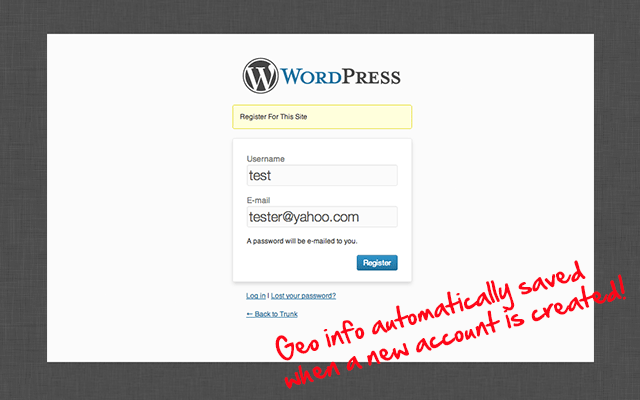
When a new user registers on your site, it captures geographic information (based on their IP address) behind the scenes. This information is then stored with their user account so you can view and use it later.
What are all the fields captured with GeoReg?
The fields captured along with an example are shown below. Please note that not all fields are always included for each user registration. It depends on the IP address and whatever data MaxMind can provide.
- IP Address – 123.456.78.90
- Country Code – US
- Country Name – United States
- City – Overland Park
- Region – KS
- Region Name – Kansas
- Latitude – 38.9593 (used for Google Maps)
- Longitude – -94.6811 (used for Google Maps)
- Postal Code – 66212
- Area Code – 913
- Metro Code – 616
How accurate is the data?
Since the plugin is dependent on the IP address and the MaxMind database, you can view the accuracy by country on their website. In some cases the data will be from the ISP of the user who registers on your website. In other cases, visitors will use a proxy or VPN to mask their true IP address so the data will not be accurate in those cases.
How does this plugin gather geographic information?
It uses the free MaxMind API which is one of the most popular and accurate IP geolocation databases available. There is no charge to use their service as long as the following link is included somewhere on your website.
This website uses MaxMind's
GeoIP JavaScript Service
If you prefer not to include the link, an attribution-free license can be purchased for $10 per million lookups from their website.
Is the geographic information visible on the author page or user profile edit screen?
Nope. It’s only viewable and editable to those with admin and/or the “edit_users” WordPress capability.
How can I test that it’s working?
Logout of WordPress and then register a new account (from wp-login.php, wp-signup.php, etc). Once the account has been confirmed, log back into WordPress as an admin and edit the new user. You’ll see a section at the bottom called “Geographic Information”.
Does capturing this data break any privacy laws?
Not that we’re aware of. The plugin uses the MaxMind free database services and works by looking up publicly available information based on the users IP address. It therefore inherits the MaxMind terms of use agreement.
Installation is a breeze. There’s no configuration required! Just upload and activate the plugin. The next time someone registers on your site, you’ll be able to view the geographic information on their user profile (admins only).
If you’re a developer and want to make changes to the plugin you can using filters. As with any WordPress theme or plugin, the best way to understand how it works is by viewing the code.
Here are the available filters:
- geo_fields – to modify or add new fields
- add_geo_fields – to modify the hidden fields and javascript output on the registration page
- show_geo_fields – to modify the output on the wp-admin edit user profile page
Got suggestions for other filters or actions? Let us know with a comment below!
== Changelog ==
1.1 – Dec 5 2014
- Fixed capturing geographic information
- Fixed map language
1.0 – Dec 5, 2012
- initial release




Comments (39)
This plugin doesn’t work. I registered an user as a test and I got nothing: no ip, no country, no region, nothing. My new users must confirm email before really get access.
I would like to know if this plugin ll be available to buy again.Thanks